GPT Image 2 release record (April 2026): text rendering, image editing and actual measurement cases
Read post
Historical reports released by GPT Image 2 in April 2026, retaining text rendering, photo generation, partial editing and actual measurement cases at that time. The original operation interface and reference number are applicable at certain times. Please refer to the actual account for the current functions and limits.
Historical information description (supplemented on September 10, 2026): This article retains the reports, comments and screenshots as of the time of publication on April 21, 2026. The "current", "latest", model opening range, price and usage limit in the article all correspond to the caliber at that time. The old operating instructions only apply to the product interface at that time and do not constitute current rights and interests or payment commitments. Please refer to the current subscription plan Plus / Pro, model interface and usage limit see Codex Description, see the recharge operation Current tutorial;The actual information is subject to subscription plan, account interface and order page prompts.
Release record: This article introduces the capabilities and experience when GPT Image 2 is released on April 21, 2026. The current image function, generation usage limit and opening status are subject to the actual account; if you need to upgrade, please check Current subscription plan / Pro and Recharge tutorial, follow the steps on the order page.
GPT Image 2 officially released: the leap from "can be generated" to "can be commercialized"
Published: April 21, 2026
OpenAI’s next-generation image generation model GPT Image 2 It has been officially launched in full volume. This isn’t a regular model iteration—it started at LM Arena in early April with maskingtape-alpha,gaffertape-alpha After the anonymous codename was accidentally leaked, community users were "collectively silenced" by the quality of its generation, and now it is open to all ChatGPT users. The debut of GPT Image 2 almost copied the leaked script of GPT Image 1.5 last year, but the shock it brought was far greater than before.
If GPT Image 1.5 makes AI image generation "barely usable", then GPT Image 2 has brought this matter into the "production level" category.
Everyone who reads the pictures generated by GPT Image 2 can’t help but exclaim:"Reality no longer exists".
I need to go back quickly and teach the elderly at home to prevent fraud, because it’s so realistic! ! !
When images are created more frequently, you can compare Current Plus / Pro subscription plan. The upgraded image functions and available usage limit are subject to the interface between subscription plan and the actual account. Please check the order page for the recharge processing time.
1. Core Upgrade: Breakthroughs in Five Major Capabilities
1. Text rendering: I can finally “write well”
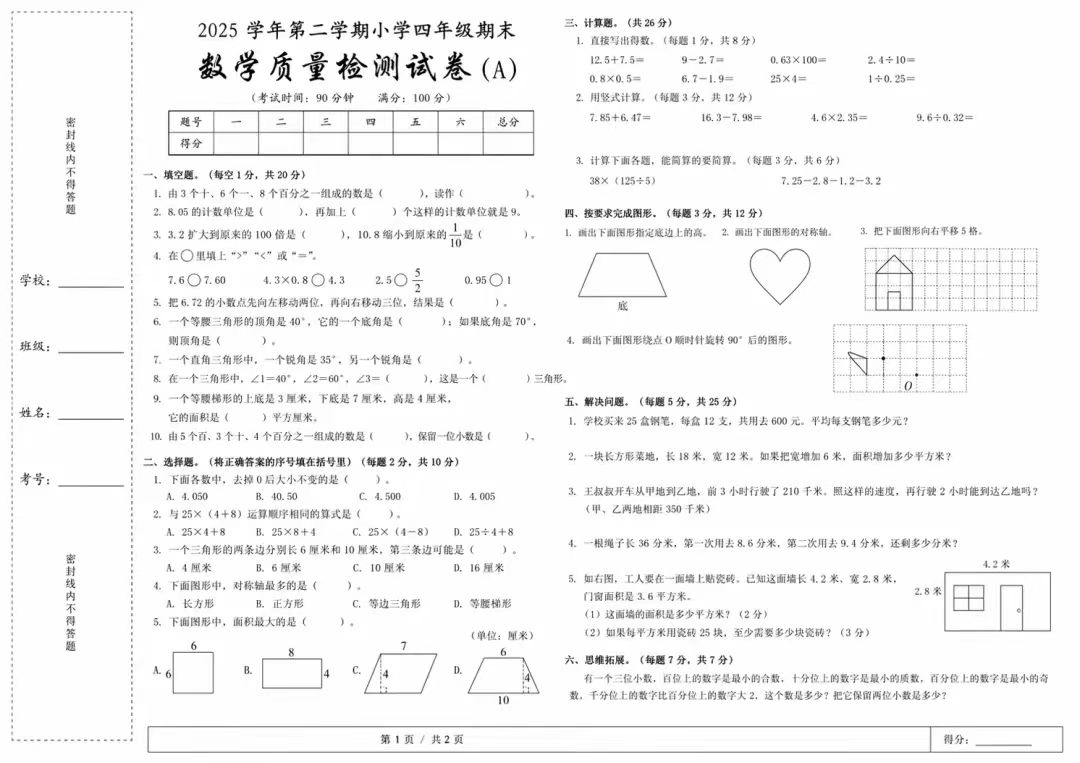
One of the most stubborn shortcomings of AI-generated images is text rendering. Garbled characters, spelling errors, and font distortion have always been common problems in the industry. The progress of GPT Image 2 in this regard is a qualitative change - it can not only generate readable and correctly spelled English and Chinese, but also handle more complex layouts, longer paragraphs, and even multi-language mixed layouts.
This means that you can directly use it to generate posters, social media covers, PPT images, and even app screenshots with real text interfaces, without the need to use Photoshop to modify the text later.
For example, the test paper (generated by GPT Image 2):
App screen simulation:
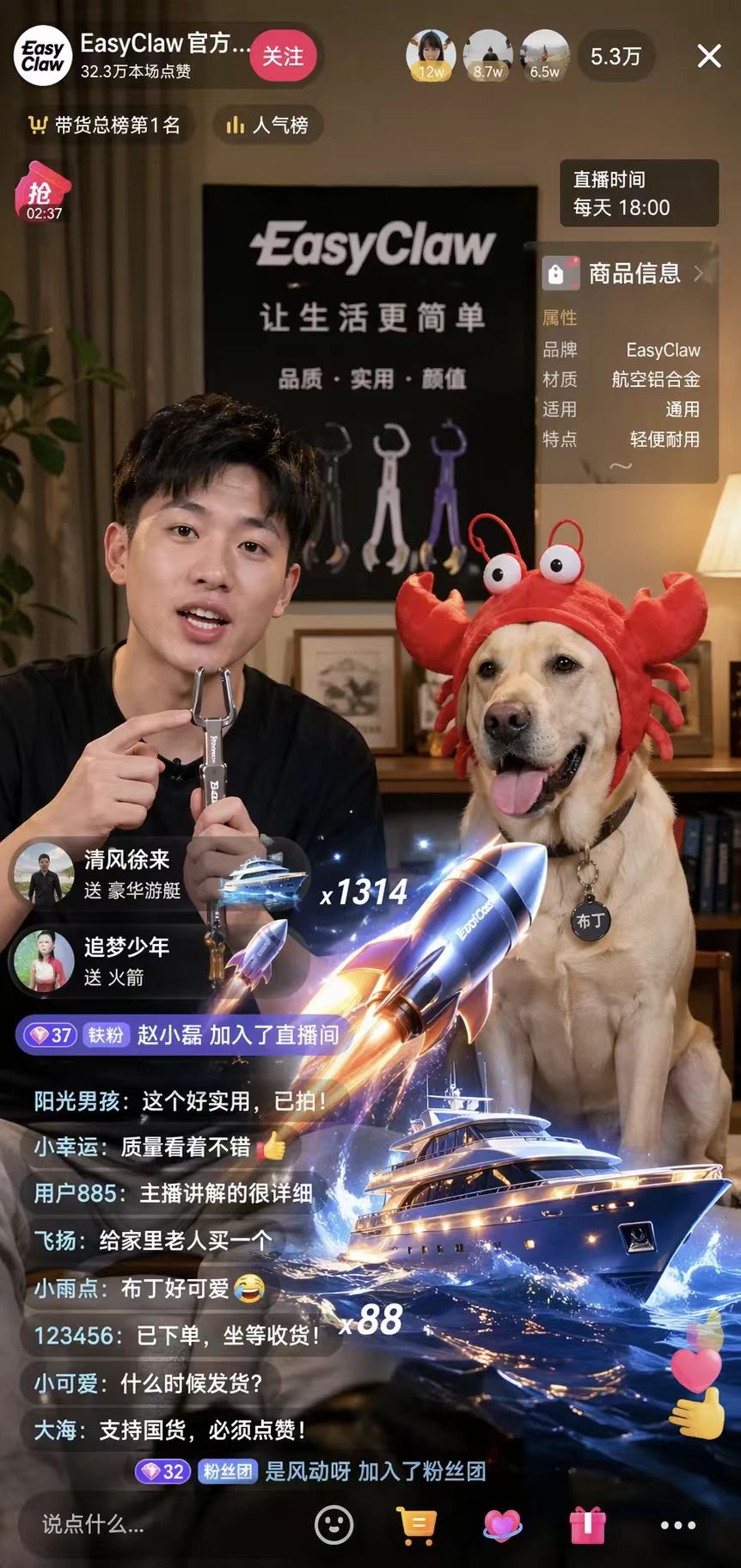
2. Photo-realism: the “AI flavor” has faded significantly
Side-by-side comparisons by community users have very consistent conclusions: GPT Image 2 has sharper image quality, more delicate textures, and photographic-level light consistency. Artifacts in human faces and hands, which were once “AI disaster areas,” have almost disappeared. Some testers described,"The things it generates no longer have a strong AI flavor. When you first see it, you will really think it is a real photo.".
3. Enhanced world knowledge: it “knows” what it is drawing
This is a hidden but extremely practical upgrade. GPT Image 2 demonstrates the ability to integrate world knowledge beyond simple pattern matching:
Can correctly render the real time logic on the watch dial
Can accurately restore real brand details and well-known character characteristics
Can generate logically clear Minecraft game screenshots or real software interfaces
It’s not about piecing together pixels, it’s about understanding how things should look.
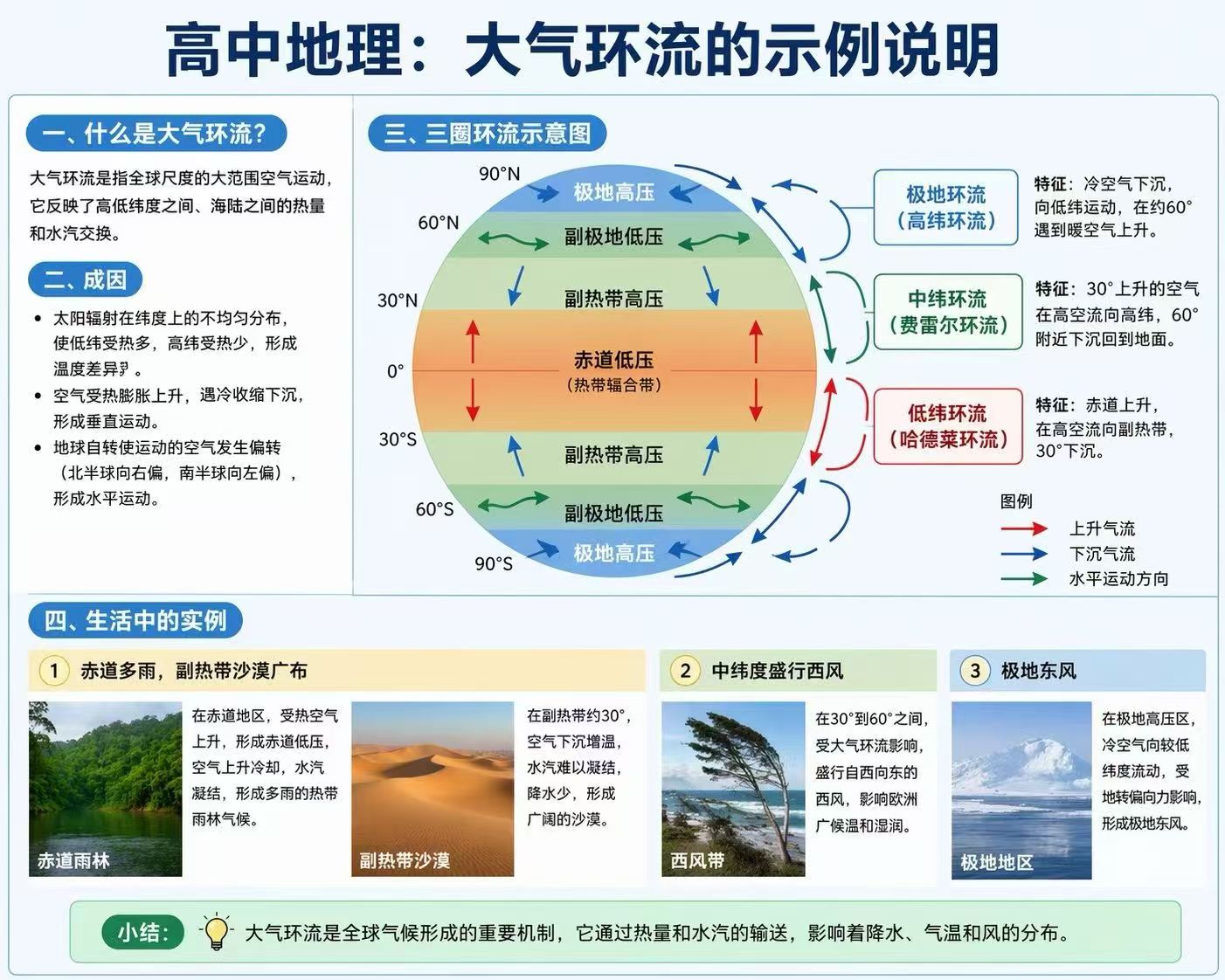
4. UI and screenshot generation: fake and real interface design
Judging from leak tests, GPT Image 2 performs amazingly well in generating software interfaces, web page screenshots, and mobile App mockups. The interface elements are aligned, the fonts are clear, and the colors are coordinated, and the overall "credibility" is extremely high. For product managers, independent developers, and designers, this means producing high-fidelity prototypes for demonstrations or user testing in minutes.
5. Localized Editing
According to leaked information, GPT Image 2 supportsLocalized editing- You can make precise modifications to specific areas of the image without regenerating the entire image. This is a huge efficiency improvement for creative workflows that require repeated fine-tuning of details.
2. How to use GPT Image 2
Used in ChatGPT (recommended)
The following operations correspond to the subscription plan experience record and the interface when this article was published. The current image function and generation limit may be adjusted, please check the available interface for the actual account first; the higher usage limit for paid subscription plan does not represent a fixed daily number of images generated.
Operation steps:
Open ChatGPT (web version or App)
Click in the input box + No.
Choose "Create Image"
Enter your prompt word and the system will automatically call GPT Image 2 to generate
💡 Experience records at the time of release, not guaranteed by the current daily quota: The following is the reference value recorded at the time of this article. It has not been continuously verified and should not be purchased or arranged for fixed output based on this.
ChatGPT Plus: Approximately every day 100 sheetsGenerate usage limit, suitable for individual creators, operators, and designers
ChatGPT Pro: every day More than 500 sheetsGenerate usage limit, suitable for high-frequency commercial use and team collaboration
To purchase, please view Current Plus / Pro subscription plan and Current recharge tutorial. Alipay and WeChat are supported. The actual rights, usage limit and processing time are subject to subscription plan, account number and order page instructions.
Use in API
Developers can call through OpenAI API gpt-image-2 Model (the specific model name is subject to official documents). Supported resolutions include:
| resolution | Applicable scenarios |
| 1024×1024 | Universal square diagram, social media avatar |
| 1536×1024 | Horizontal covers, slideshows, widescreen wallpapers |
| 1024×1536 | Vertical posters, mobile wallpapers, story illustrations |
| 2048×2048 | High-definition printing, large-scale display, fine illustrations |
3. Drawing cases and prompt word references
The following cases are based on community leak testing and early user feedback, covering several high-frequency usage scenarios.
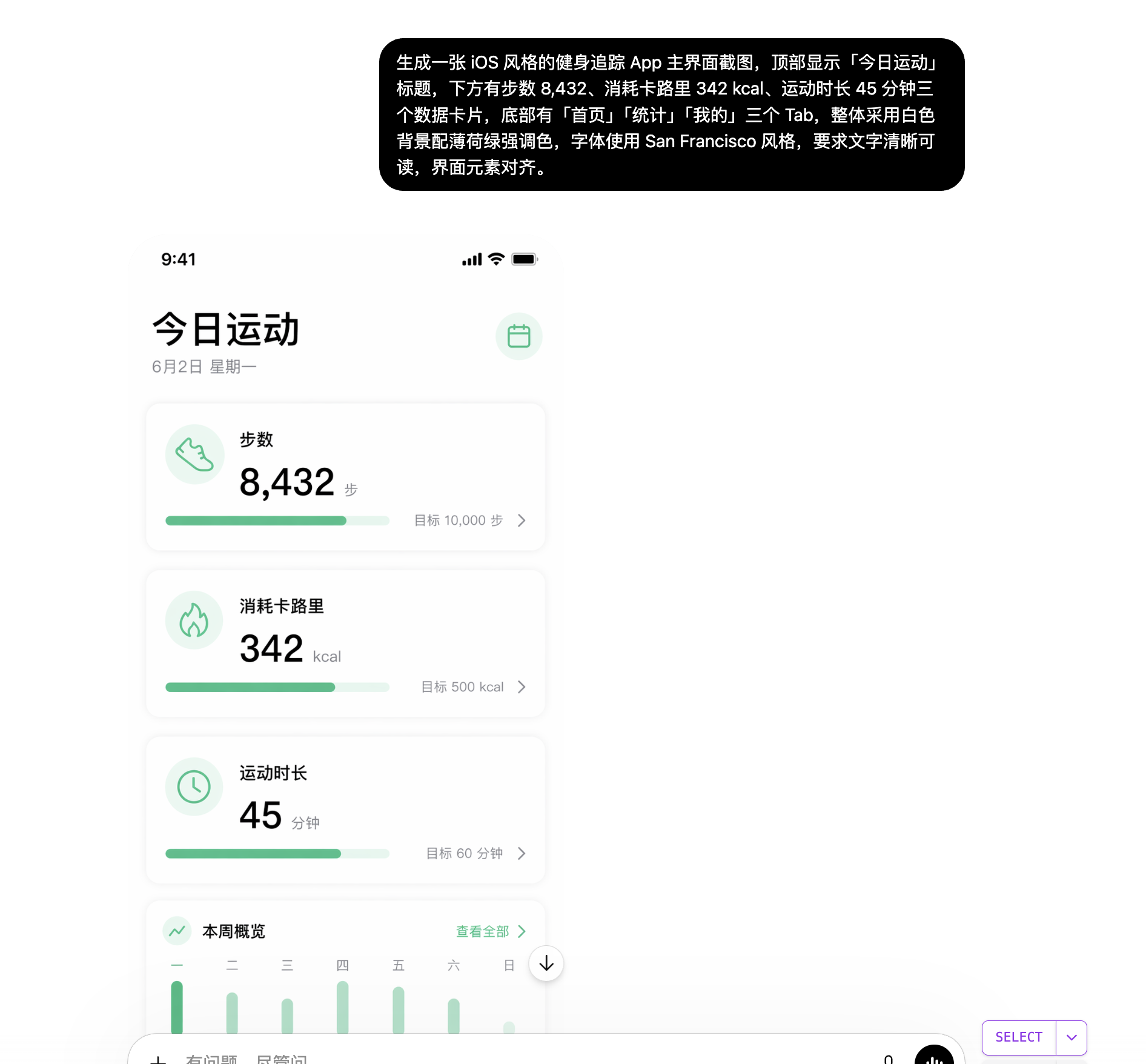
Case 1: App interface screenshot (UI/UX design)
Prompt words:
"Generate a screenshot of the main interface of an iOS-style fitness tracking app. The title "Today's Exercise" is displayed at the top. There are three data cards below: 8,432 steps, 342 kcal burned, and 45 minutes of exercise. There are three tabs at the bottom: "Home", "Statistics" and "My". The overall use is a white background with mint green accent color. The font uses San Francisco style. The text is required to be clear and readable, and the interface elements are aligned. "
Effect characteristics: The interface layout is reasonable, the text is clear, and the color matching is coordinated. It can be directly used for product prototype demonstrations.
Case 2: E-commerce product pictures (commercial photography grade)
Prompt words:
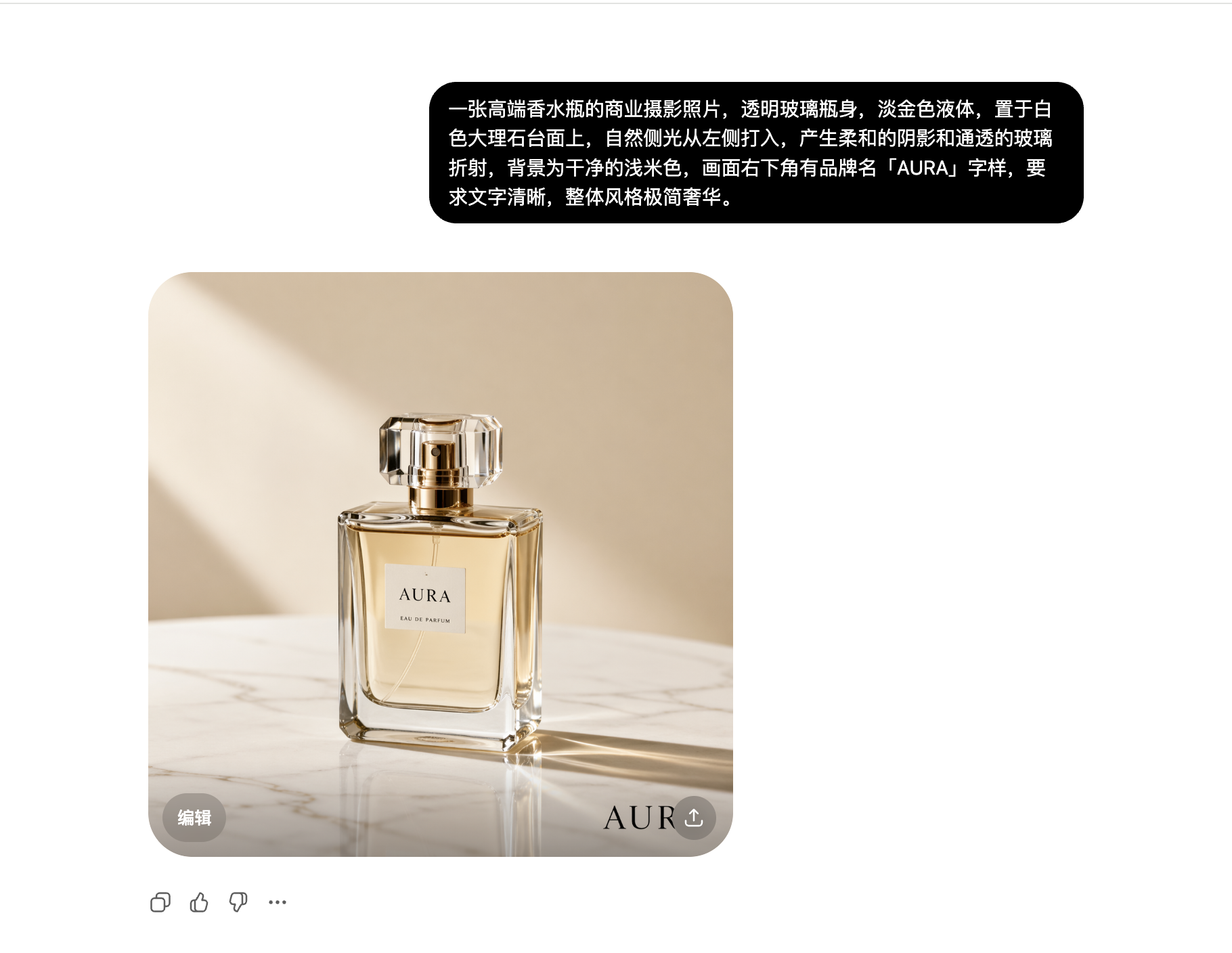
"A commercial photography photo of a high-end perfume bottle, with a transparent glass body and light golden liquid, placed on a white marble countertop. Natural side light enters from the left, producing soft shadows and transparent glass refraction. The background is a clean light beige color. There is the brand name "AURA" in the lower right corner of the picture. The text is required to be clear and the overall style is minimalist and luxurious. "
Effect characteristics: The material texture is realistic, the light and shadow logic conforms to the laws of physics, and the text is garbled. It can be directly used on e-commerce details pages.
Case 3: Text poster (marketing material)
Prompt words:
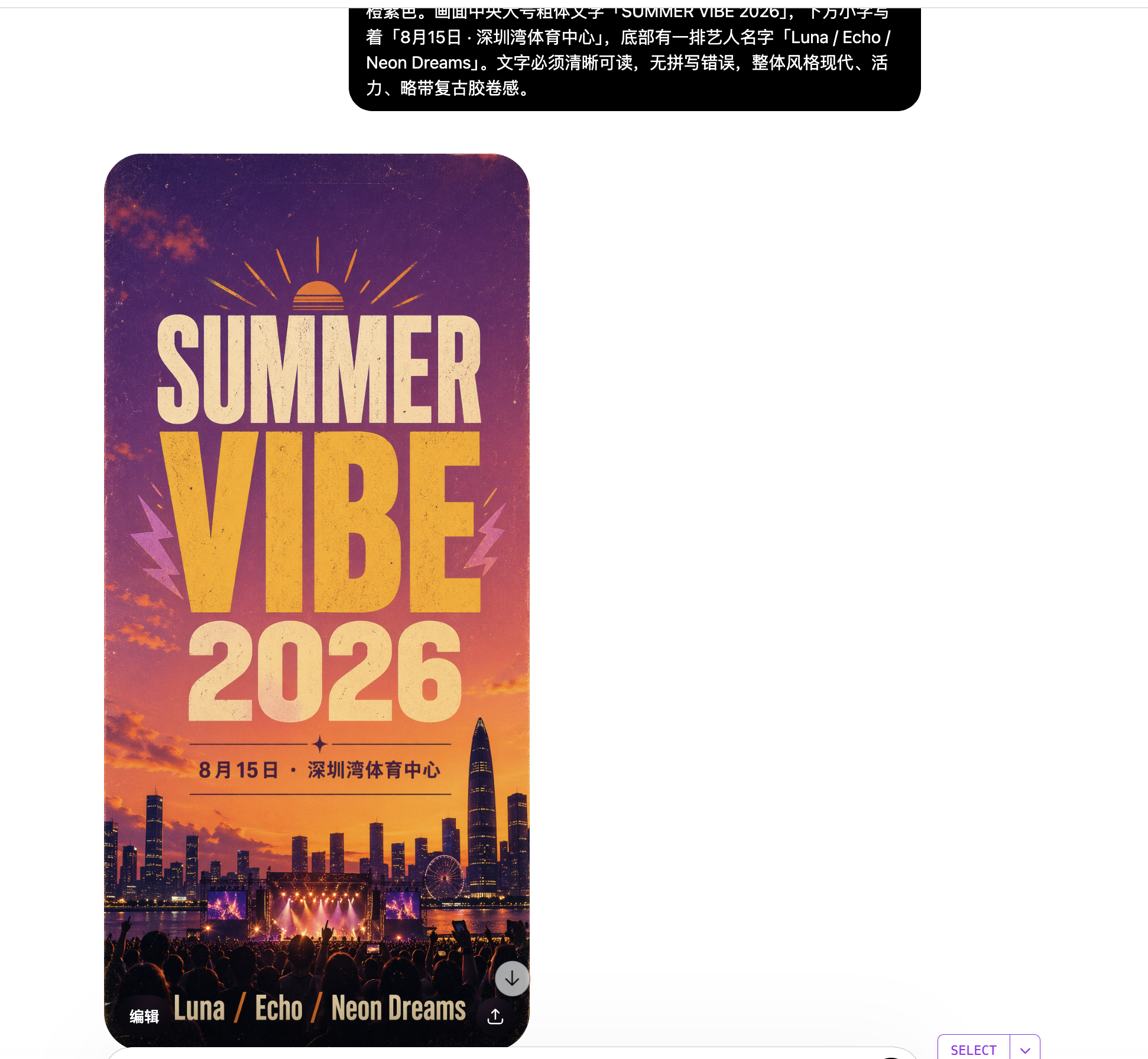
"A vertical music festival poster with a city skyline silhouette at dusk in the background and a gradient orange-purple sky. The large bold text "SUMMER VIBE 2026" is in the center of the screen, and the small text below reads "August 15th · Shenzhen Bay Sports Center". There is a row of artist names at the bottom "Luna / Echo / Neon Dreams". The text must be clear and readable, with no spelling errors, and the overall style must be modern, dynamic, and slightly retro-film-like. "
Effect characteristics: Long text typesetting is stable, Chinese and English are mixed without garbled characters, and the style is unified.
Case 4: Game concept drawing/"fake screenshot"
Prompt words:
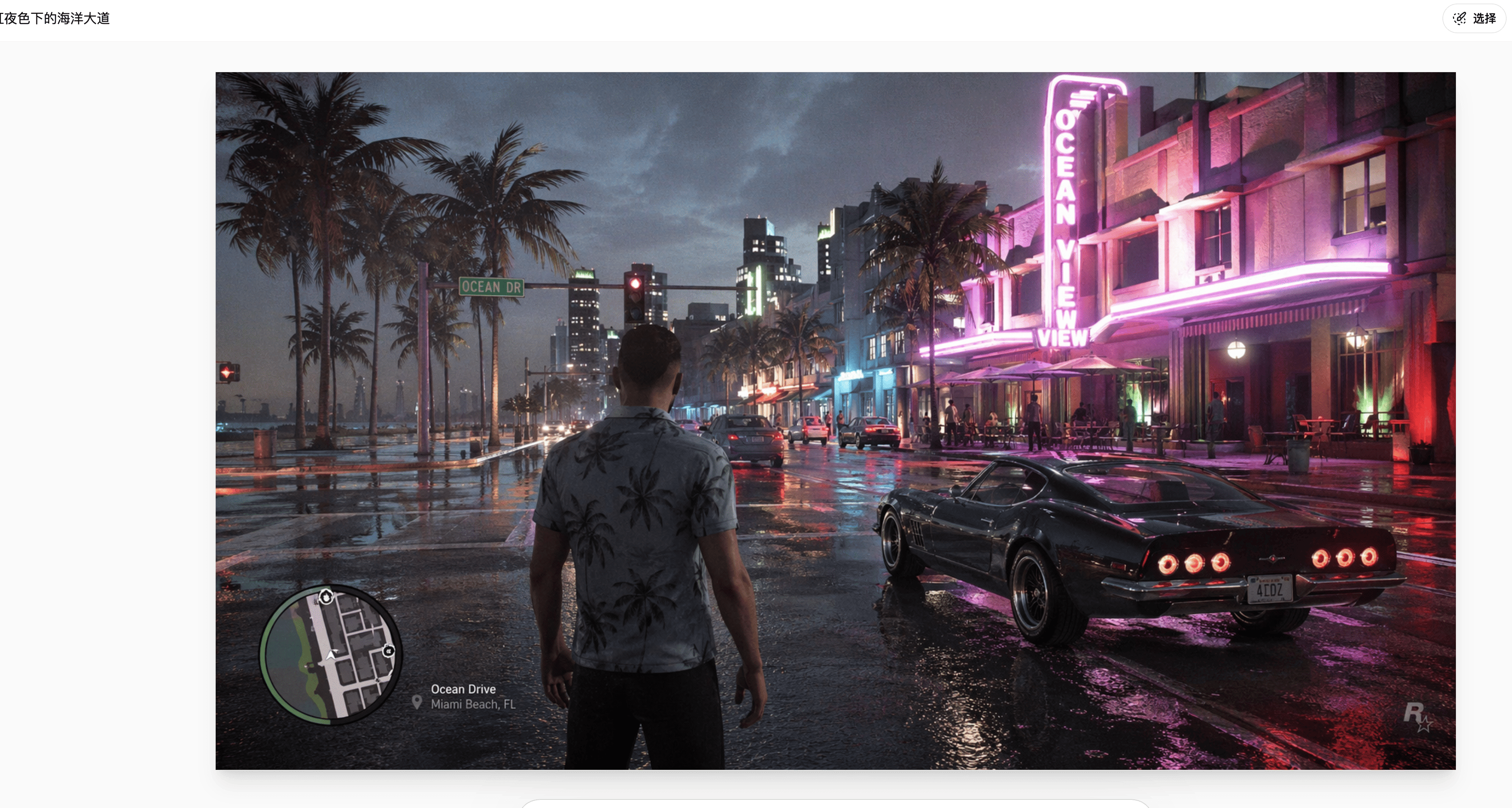
"Generate a "GTA6" style game screenshot, from a third-person perspective. The protagonist is standing on a Miami-style neon street. There are reflections of water on the ground after the rain. There are palm trees and retro sports cars in the distance. The picture has a cinematic depth of field and a slight graininess. The picture is required to look like a real PS5 game screen."
Effect characteristics: This was one of the most out-of-circuit testing directions during the GPT Image 2 leak. The resulting results were widely shared on social media, with many users initially mistaking them for genuine game leak screenshots.
Case 5: Realistic portraits and creative portraits
Prompt words:
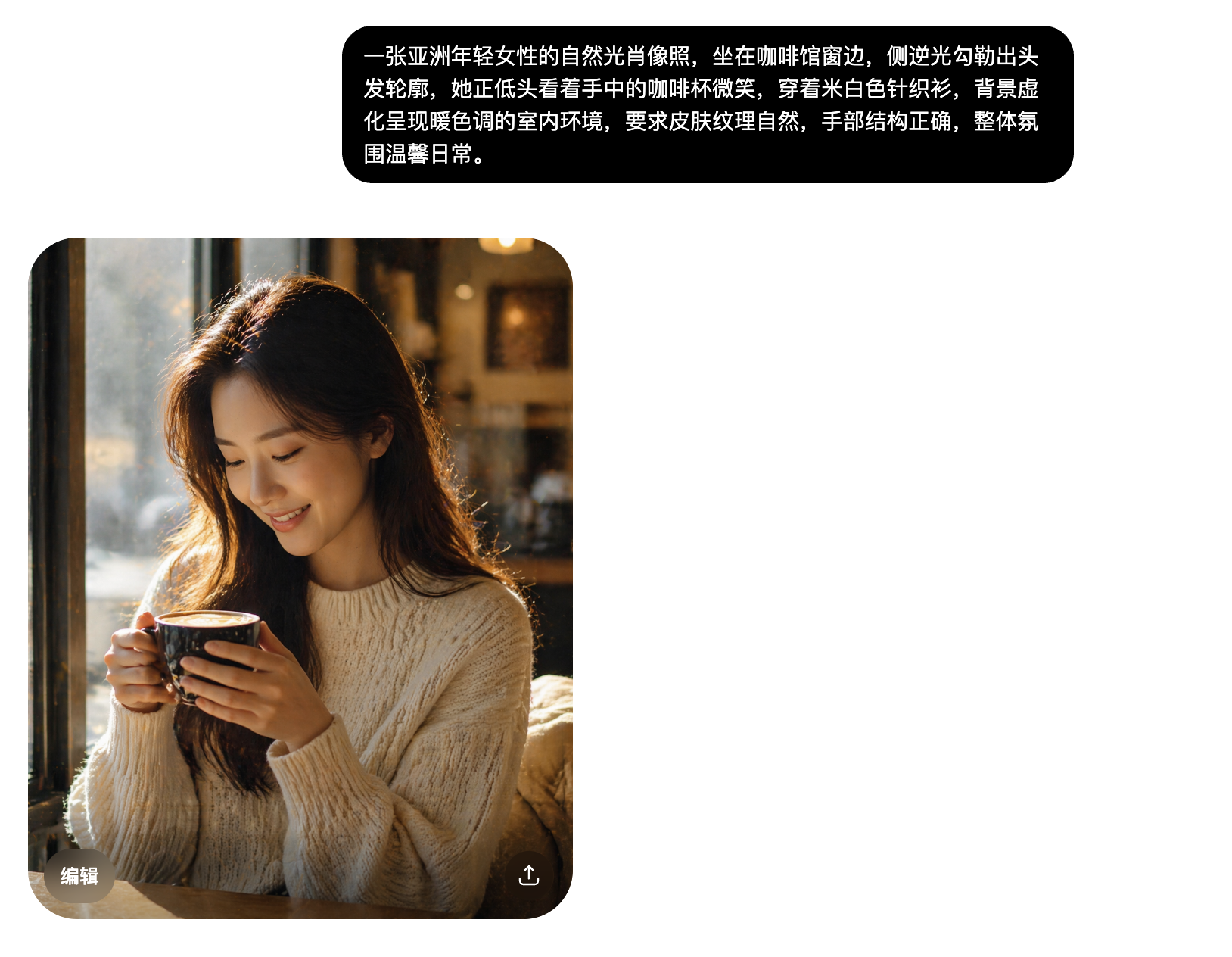
"A natural light portrait of a young Asian woman, sitting by the window of a cafe, with the side backlight outlining her hair. She is looking down at the coffee cup in her hand and smiling. She is wearing an off-white sweater. The background is blurred to present a warm-toned indoor environment. The skin texture is required to be natural, the hand structure is correct, and the overall atmosphere is warm and everyday."
Effect characteristics: Skin texture, hair details, and hand structure all reach usable levels, with natural light and shadow, and extremely low "AI feeling".
Case 6: Food photography (restaurant menu/takeaway platform)
Applicable scenarios: Catering brand promotion, takeout platform header image, Xiaohongshu/Instagram content
Prompt words:
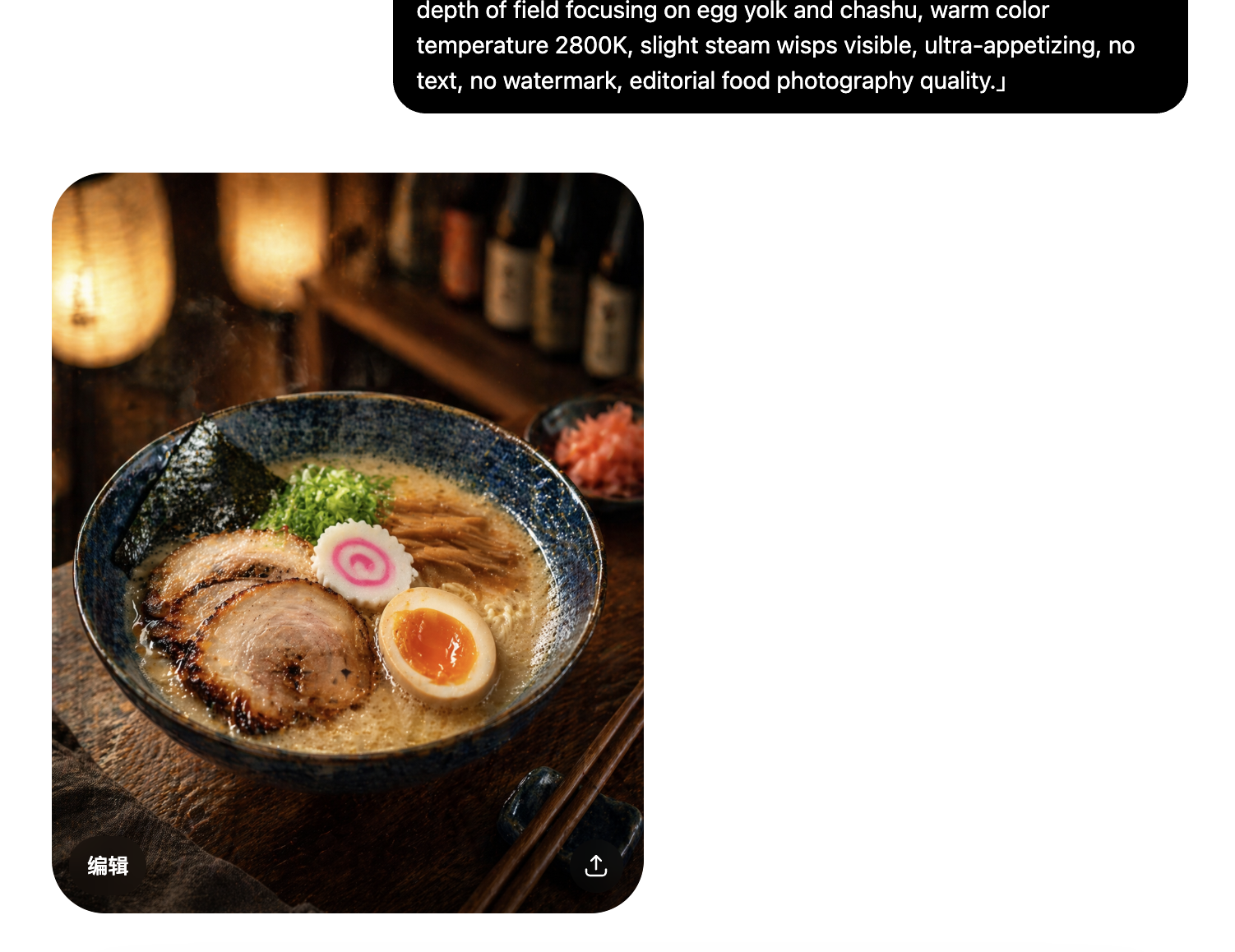
"Michelin-star restaurant food photography, 45° angle overhead shot, a bowl of authentic Tokyo-style tonkotsu ramen on a dark walnut wooden table. Bowl: handmade ceramic in deep navy blue with crackle glaze texture. Broth: rich creamy pork bone broth with visible collagen sheen, glistening under soft side lighting. Toppings: two slices of chashu pork with visible fat layers and charred edges, a perfectly halved soft-boiled egg with runny orange Yolk center, bamboo shoots (menma) in warm brown, nori sheet partially submerged in broth, scallion rings in bright green, a single narutomaki fish cake with pink spiral.
Background: blurred Japanese izakaya interior with warm paper lanterns bokeh, wooden counter, sake bottles out of focus. Chopsticks resting on ceramic holder at right edge, small dish of pickled ginger in corner. Lighting: large softbox from left creating soft shadows and broth highlights, small fill light from front to reveal noodle texture. Shot on Sony A7R V, 90mm macro lens, f/2.8, shallow depth of field focusing on egg yolk and chashu, warm color temperature 2800K, slight steam wisps visible, ultra-appetizing, no text, no watermark, editorial food photography quality.」
Effect characteristics: The food texture (soft-boiled eggs, barbecued pork fat, soup base gloss) is extremely attractive, and the depth of field control is professional. It can be directly used for the menus of high-end catering brands or the main image of takeout platforms.
Case 7: Science education illustration (textbook style)
Applicable scenarios: Online education, popular science articles, textbooks with pictures
Prompt words:
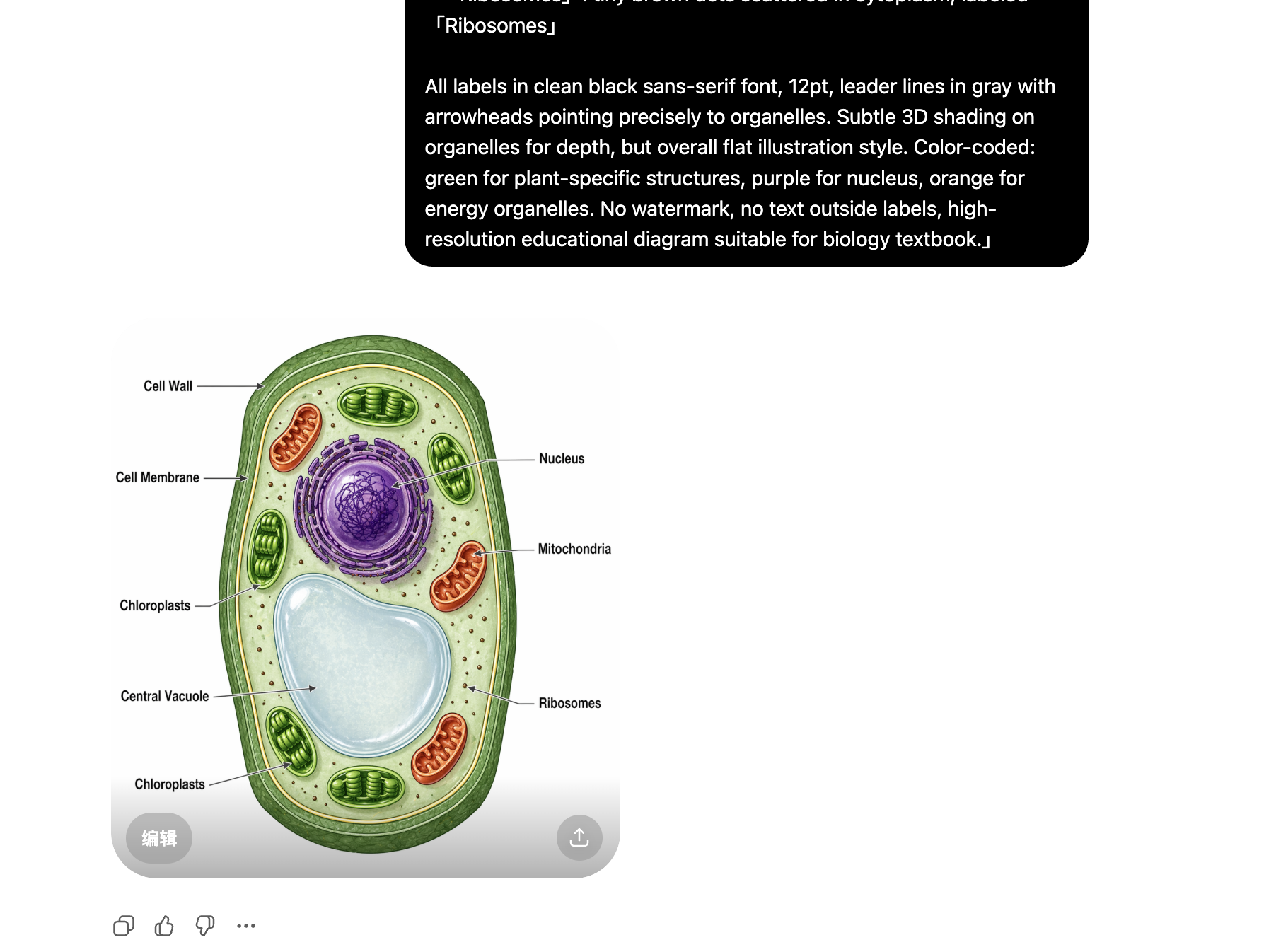
"Educational scientific illustration, clean textbook style, white background, a detailed cross-section diagram of a typical plant cell. Central oval cell shape with light green cytoplasm. Labeled organelles with leader lines and clear text:
「Cell Wall」: thick dark green border with cellulose texture pattern
"Cell Membrane": thin line just inside cell wall
「Nucleus」: large purple sphere at center with darker chromatin threads inside, labeled 「Nucleus」
"Mitochondria": three bean-shaped organelles with inner cristae folds in orange-red, labeled "Mitochondria"
「Chloroplasts」: five oval green structures with internal thylakoid stacks, labeled 「Chloroplasts」
「Vacuole」: large clear central sac taking 40% of cell volume, labeled 「Central Vacuole」
"Ribosomes": tiny brown dots scattered in cytoplasm, labeled "Ribosomes"
All labels in clean black sans-serif font, 12pt, leader lines in gray with arrowheads pointing precisely to organelles. Subtle 3D shading on organelles for depth, but overall flat illustration style. Color-coded: green for plant-specific structures, purple for nucleus, orange for energy organelles. No watermark, no text outside labels, high-resolution educational diagram suitable for biology textbook.
Effect characteristics: GPT Image 2 can not only draw “good-looking” pictures, but also generateAccurate information and clear labelingeducational illustration. The text annotation is accurately positioned and scientifically structured, making it suitable for direct use in courseware or popular science content.
4. Comparison with GPT Image 1.5 / Nano Banana Pro
| Dimensions | GPT Image 1.5 | GPT Image 2 | Nano Banana Pro |
| text rendering | Good, with occasional minor mistakes | Big jump, long text stable | Excellent, industry standard |
| photorealism | good | Photographic grade, AI tasteless | Excellent, strong cinematic feel |
| world knowledge | Average | Significantly enhanced | better |
| UI/screenshot generation | Available | Confuse the real with the fake | good |
| local edit | Not supported | support | Partially supported |
| highest resolution | Level 1024 | 2048×2048 | 1024/1536 level |
Judging from the blind test results, GPT Image 2 has surpassed Nano Banana Pro in the anonymous duel at LM Arena, while Nano Banana Pro had previously been the industry benchmark in early 2026.
To learn more about the detailed capabilities of GPT Image 1.5, please refer to OpenAI GPT Image 1.5 Release Interpretation.
5. Usage tips and suggestions
The more specific the description, the more accurate the results will be: GPT Image 2’s instruction compliance has made a qualitative leap. Don’t just say “a cat,” say “an orange and white British shorthair cat sitting on a dark blue velvet sofa, side light, studio style.”
Explicitly specify text content: If you need text to appear in the picture, write the text you want directly in the prompt word and mark it with quotation marks, for example: "In the center of the screen is written "Limited Time Special Offer" in four big red characters."
Make good use of the aspect ratio parameter: Select the appropriate resolution according to the usage scenario. Use 1536×1024 for horizontal printing, 1024×1536 for vertical printing, and 2048×2048 for print-level requirements.
Evaluate subscription plan according to creative needs: Designers, operators, content creators or developers can compare the current image functions of Plus / Pro with usage limit, and arrange work based on actual account availability. The historical number of pictures in this article is not used as a production guarantee.
6. Write at the end
OpenAI has been announced to May 12, 2026DALL-E 2 and DALL-E 3 are officially out of service. This time point highly coincides with the launch window of GPT Image 2, marking a comprehensive replacement of the OpenAI image generation technology stack.
From DALL-E to GPT Image 1, and now to GPT Image 2, OpenAI completed the triple jump from "toy" to "tool" to "productivity" in less than two years. For creators, this means a lower threshold for drawing and faster iteration speed - but it also means that"Being able to use AI to generate pictures" itself is changing from a competitive advantage to a basic skill.
If you haven’t experienced GPT Image 2 yet, open ChatGPT now and click that + No., see for yourself whether this upgrade is as "top" as rumored.
Domestic upgrade interface: This site supports ChatGPT Plus / Pro Recharge, Alipay and WeChat payment. Check before ordering Current tutorial, follow the steps on the order page to complete; image rights and usage limits are subject to the selected subscription plan and the actual account number.