How to use GPT-6 Astra? How to recharge? ChatGPT Plus/Pro open range and Codex upgrade guide
Read post
GPT-6 Astra has been opened to Pro/Plus users in batches, and Plus users can also use it in Codex and Work. This summary of official instructions and user feedback introduces the latest client application requirements, the differences between the use of Plus and Pro, interface and usage limit.
GPT 6 has been opened to Pro/Plus users, and Plus users can also use GPT-6 Astra. The use of Plus interface includes Codex and ChatGPT Work; Users who already have Plus, please update Codex to the latest version first, and then check the model list. When interface appears in the specific account still depends on the progress of the opening.Official subscription plan and dosage instructions
For ChatGPT in the chat window GPT-6 Pro, as of September 5, 2026, Beijing time, the OpenAI Help Center lists the open scope as Pro 100 USD, Pro 200 USD, and eligible Business, Enterprise subscription plan. This is different from Plus using Astra in Codex / Work interface.Official permission description

From the announcement to Pro users actually receiving interface
On September 3, OpenAI officially introduced GPT-6 Astra and announced that it would be open to some organizations first, and then gradually expand to paying users and APIs. The subscription plan list in the announcement describes the overall open plan. To determine which product you can use, you need to combine the specific permissions.OpenAI Announcement
The public information in these two days can be divided into three levels:
Official documentationIt has been clarified that the open scope of ChatGPT of GPT-6 Pro is the main basis for judging the rights and interests of subscription plan.OpenAI Help Center
Domestic and foreign mediaMainly reports on new model releases and gradual opening arrangements. Sina Finance introduced the launch plan for the first batch of trusted organizations and subsequent paying users; 9to5Mac focused on the upgrades of ChatGPT and Codex.Sina Financial Report,9to5Mac reports
User feedbackIn Reddit, user Pro has posted a message stating that he received Astra. This can reflect that some accounts have been opened, but it does not mean that all regions and all accounts are available at the same time.Community Feedback: Pro user here. Astra just landed.
What is the difference between GPT-6 Pro and GPT-6 Astra?
You can first distinguish by using interface: GPT-6 Pro in Chat is driven by Astra; GPT-6 Astra name is used in Work and Codex.Plus users can also use Astra in Work, Codex, it cannot be directly understood that Plus chat window also has GPT-6 Pro. The opening progress and usage rules of the three interface may be different.Official Work / Codex subscription plan description,Chat permission description
Plus users can also use GPT-6 Astra
The official usage table of OpenAI has been listed Plus subscription plan GPT-6 Astra usage limit. Therefore, users who already have ChatGPT Plus can first check their Codex / Work model interface; there is no need to upgrade to Pro first to experience Astra. Plus is different from the available usage limit of Pro. The actual consumption is related to the complexity of the task. The remaining usage limit and reset time are subject to the account display.Official dosage instructions
Plus users also need to update Codex to the latest version. If Astra interface is still not available after the update, first confirm that you are logging in with an account that has subscribed to Plus; if the account and subscription are normal, you may need to wait for the subsequent grayscale opening.
How many Pro users have chatted with usage limit?
GPT-6 Pro is not unlimited use. The following was verified on September 5th Chat usage limit:
| subscription plan | GPT-6 Pro usage limit | Related to GPT-5.6 Sol Pro |
| Pro 100 USD | 50 items per week | Both models share these 50 |
| Pro 200 USD | 200 items per week | Sol Pro and another 170 messages per day; the combined maximum of the two is 200 messages per day |
Work and Codex calculate usage separately; subsequent adjustments and reset times are displayed in account numbers andOfficial limit descriptionshall prevail.
What’s worth paying attention to with this upgrade?
The release of OpenAI focuses on computer operations, software engineering, research, and multi-step professional work. Astra can organize tool operations around the same task and create documents, forms, and presentations based on templates; officials also emphasized the ability to maintain task context when adding requirements midway.OpenAI capability introduction
For everyday use, these capabilities can be understood as being more suitable for tasks that require continuous execution. For example, collate multiple pieces of information and generate a report with sources, or inspect a project, modify questions, and verify results. These are usage scenarios based on official capability descriptions, not actual test conclusions on this site.
Evaluation scores also need to be read in conjunction with the testing environment. What is officially reported is the performance under specific tasks and tool configurations, which cannot be directly converted into the work efficiency of each user, nor can it be asserted that the model can reliably complete all tasks based on a single score.
I have subscribed to Pro/Plus, how to check next?
Before using Codex, please upgrade to the latest version first, and then check whether GPT-6 Astra has appeared. Desktop client application, CLI or IDE extension, please update the interface you actually use. The instructions for OpenAI require Astra to use Codex CLI 0.153.0 or newer, and recommend updating to the latest desktop client application.Official release notes
The following is a screenshot of my Pro account in Codex:
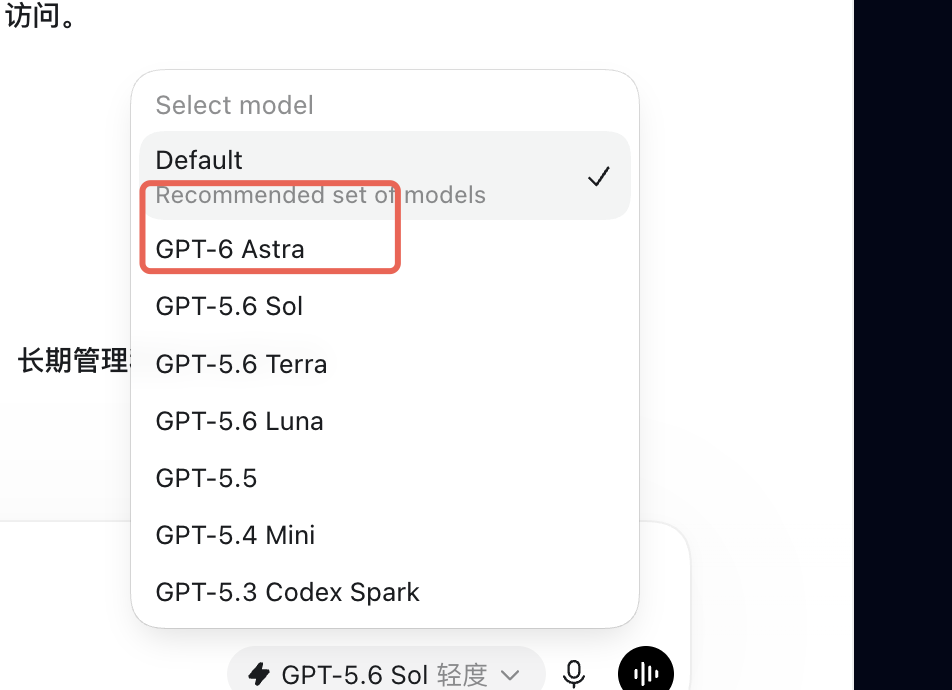
Combining my own account and current user feedback, I judgeMost Pro users should have reached grayscale;This is a personal observation, not an official coverage ratio.If you still don’t have GPT-6 Astra after updating to the latest version, you may need to wait for the account to be opened in grayscale.
You can check in this order:
Update Codex to the latest version and reopen client application;
Check that the currently logged in account is one that has subscribed to Pro or Plus;
Find GPT-6 Astra in the Codex model selector;
Organization accounts check the administrator's model permission settings;
If there is still no interface after the update, and the account and subscription are normal, wait for the subsequent grayscale to be opened.
When there is no interface at the moment, check "whether the subscription is valid" and "whether the model is open" separately. Do not assume that your order is abnormal just because others have received the model; and do not purchase subscriptions repeatedly just to refresh the model list.
If you want to know the background of previous releases, you can read GPT-6 Astra Release and Usage Guide. If you need to view the subscription services of this site, you can go to Plus / Pro subscription plan comparison or ChatGPT Pro page, first check subscription plan and the order description before deciding whether to purchase.
This article is compiled based on searchable official announcements, media reports, and community feedback as of September 5, 2026. The permissions of subscription plan are subject to the official help center, and the community experience is only a supplement.